 MoveShare

Ask Claude About Your Workouts: Charts and Weekly Reviews
Connect MoveShare to Claude and analyze your workouts in plain language. Get progress charts, weekly reviews and answers your app's screens can't give.

Your fitness app knows a lot about you. Once you connect Apple Health, MoveShare syncs every walk, run, swim and gym session automatically. But an app can only answer the questions its screens were designed for.
What about the questions you actually have? Did I train more this autumn than in spring? Am I still on track this week? Which month was my best for strength training? Answering those usually means scrolling, tapping and doing the math yourself.
Now you can just ask. MoveShare connects to Claude through its MCP connector, so you can analyze your training in plain language and get an answer, a chart or a weekly review back. No exports, no spreadsheets.
Things you can ask
You don't need special commands. Ask the way you would ask a friend who knows your training log, and ask for a chart when you want to see it.
Compare two periods
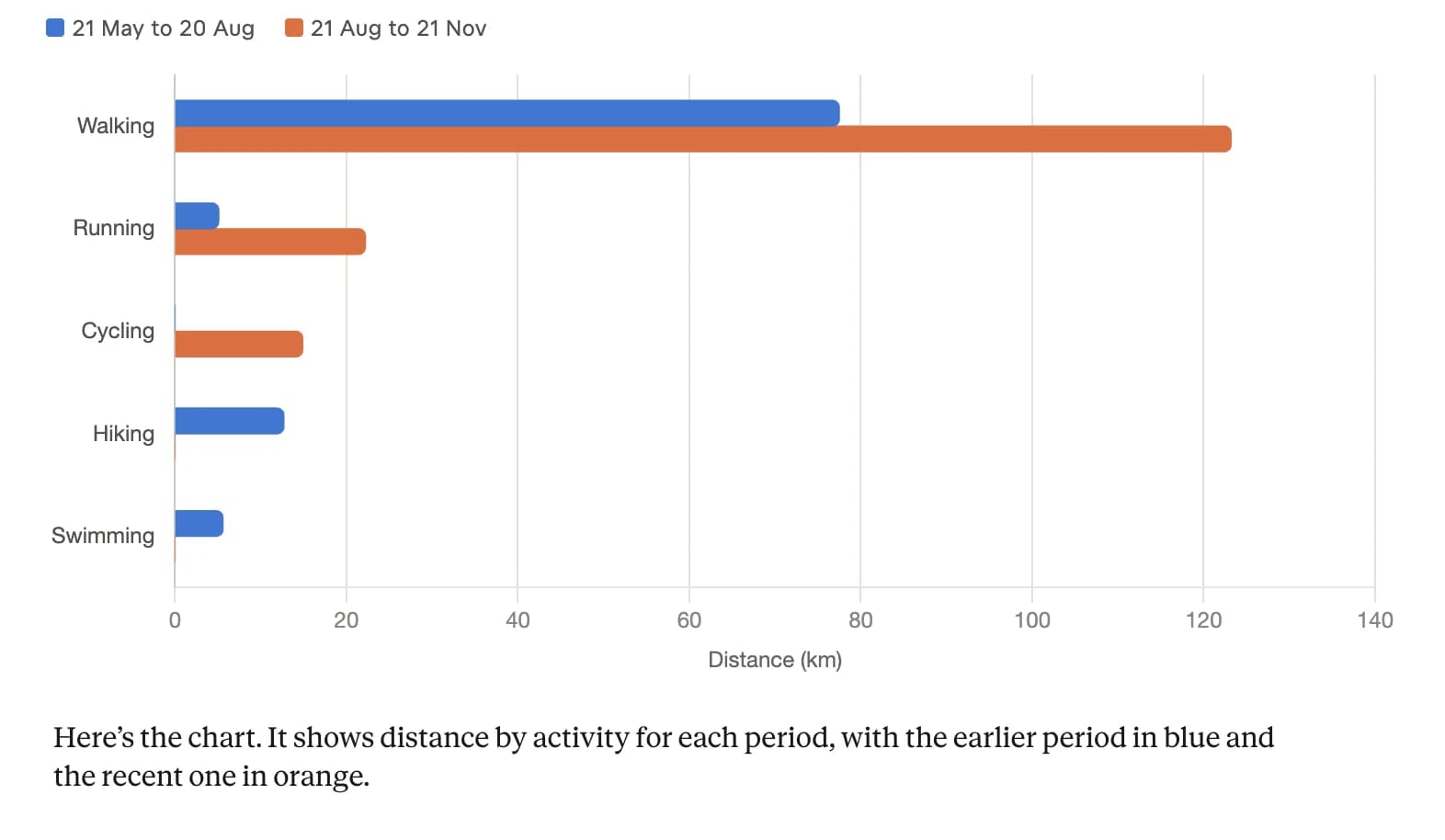
This is a hard question to answer in any app. Claude puts the two periods side by side, so the change is easy to spot: a lot more walking, running and cycling this autumn, while hiking and swimming stayed in the summer.
Check in on this week's goals

Claude reads your weekly goals and shows where you stand and what is left. If you share weekly goals with friends, it can also show how the group is doing.
Review your week and plan the next
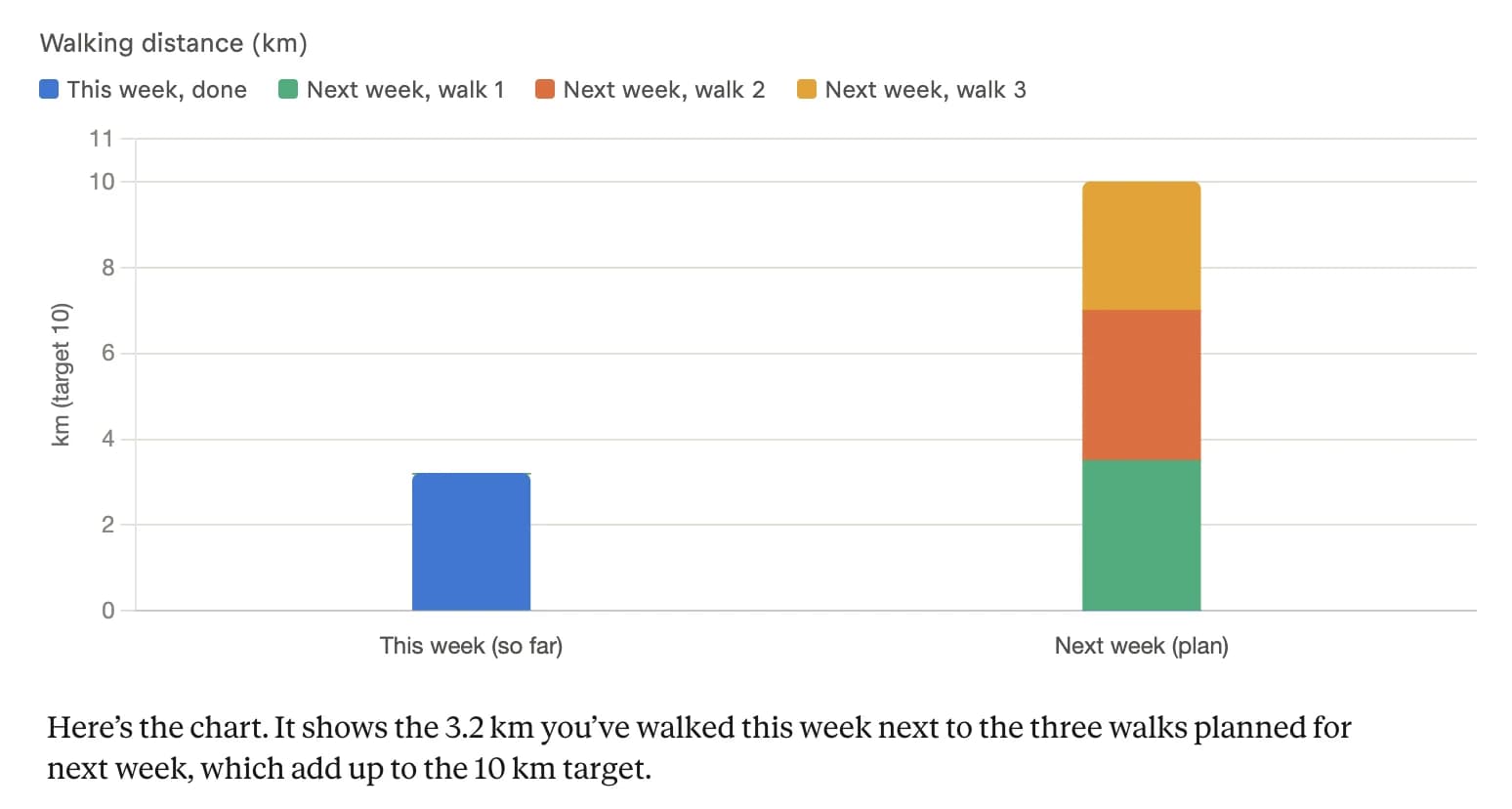
A good review looks at what you actually did, not what you planned, and turns the gap into something you can do. Here, next week's 10 km walking goal becomes three walks.
More to try
- Chart my workouts per month this year, split by workout type.
- Show my strength sessions per month as a line chart. Is it going up?
- Make a table of my personal records, newest first.
- Which week this year was my most active? Show it next to an average week.
What it solves
Your questions don't fit into fixed screens
Fitness apps show the same charts to everyone. Your questions are personal: a specific month, one workout type, a comparison between two periods. Claude reads your MoveShare data and answers the question you asked, not the closest screen.
Numbers are easier to understand as a picture
A list of workouts doesn't tell you much. A chart of the last six months does. Ask Claude to draw it, and it can turn your training into a bar chart, a line chart or a simple table in seconds.
Reflection takes time you don't have
A weekly review is one of the best habits for staying consistent, and one of the first to be skipped. With Claude it takes one question: what went well, what slipped, and what to aim for next week.
Tips for better answers
- Name the time range. "Since May" or "the last 8 weeks" gets a sharper answer than "lately".
- Ask for the format you want. Chart, table, short list or a single sentence.
- Keep the conversation going. Follow-up questions are where it gets useful: why did September drop?, only count strength training.
- Ask in your own language. Claude answers in the language you write in, and MoveShare tells it your units.
- Check against the app when it matters. Claude writes its own summary and can make mistakes. The MoveShare app is the source of truth for your workouts, goals and streaks.
You stay in control
Connecting Claude doesn't mean handing over everything.
- Read-only. Claude can't log workouts, change goals, give Kudos or post anything.
- You choose what it reads. Pick any of workouts, goals and friends when you connect, and change it later.
- Some things are never shared. Route maps, heart rate, your email address, profile photos and your friends' workouts.
- What Claude reads stays in your chats. Disconnecting stops new reads; delete those chats to remove what it already has.
- Disconnect anytime from moveshare.app/connect/manage or from Claude's settings.
Everything about what is shared and how to disconnect is on the AI assistant help page.
How to start
- Open MoveShare in Claude's directory and select Connect.
- Sign in with the Apple or Google account you use in the app and choose what Claude may read.
- Ask your first question.
New to MoveShare? Get the iPhone app first. Connecting needs an active MoveShare Pro subscription, and works with Claude on the web and in the desktop app.
FAQ: Asking Claude about your workouts
What can I ask Claude about my workouts?
Anything your MoveShare data can answer: how your training changed over weeks or months, how you are doing on this week's goals, your personal records, or a summary of your last workouts. Claude can also turn the answer into a chart or a table.
Can Claude change my workouts or goals?
No. The connection is read-only. Claude can't log or edit workouts, change goals, give Kudos or post anything.
Does Claude see my friends' workouts?
No. If you choose to share goals, Claude sees the names and progress of people in goals you share, and if you share friends it sees their display names. It never sees your friends' workouts, your route maps or your heart rate.
Do I need MoveShare Pro?
Yes. Connecting Claude to MoveShare requires an active MoveShare Pro subscription on the account you sign in with.
Can I ask in my own language?
Yes. Ask in whatever language you normally use with Claude. MoveShare also tells Claude your units, so distances come back in kilometers or miles as you set them in the app.